
User Guide
USB tab (Inseego Connect)
Use this tab in Inseego Connect to view and manage USB serial settings when using Out of Band Management (OOBM). For more information on OOBM, see Out-of-Band Management tab.
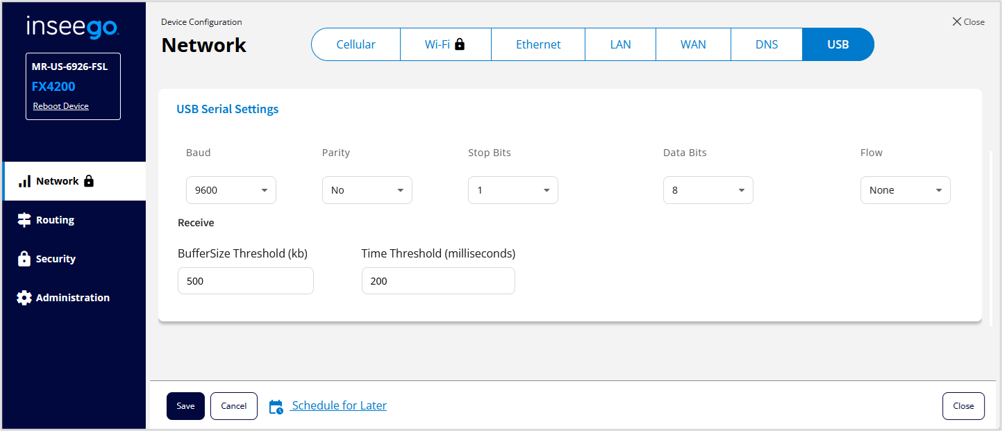
USB Serial Settings
Identify the serial connection configuration information of the console port on the serial interface device you are managing with OOBM. Then ensure that the serial connection configuration information on this tab matches that of the serial interface device.
NOTE: Both devices must possess identical serial settings.
Baud: The maximum rate (in bits) at which data is transferred per second. For example, 9600 indicates that the serial connection is capable of transferring a maximum of 9600 bits per second. Use the dropdown to select the value that matches that of the serial interface device.
Parity: Indicates whether parity is used (Yes or No). Use the dropdown to select the value that matches that of the serial interface device.
Stop Bits: Indicates whether stop bits is set to 0 or 1. Stop bits are used to signify the end of a data packet or byte. Use the dropdown to select the value that matches that of the serial interface device.
Data Bits: Indicates whether data bits is set to 7 or 8. This is the number of bits of data in each frame. Binary protocols use 8 data bits. ASCII data can be sent using 7 or 8 bits, for example Modbus ASCII. Use the dropdown to select the value that matches that of the serial interface device.
Flow: Indicates the flow control method (None, Software, or Hardware). Flow control ensures data is transmitted without loss or overflow. Hardware flow control methods (such as RTS and CTS) use control lines to regulate data flow between devices. Software flow control methods (such as XON/XOFF) use control characters to signal when to start and stop data flow and are useful in environments where hardware flow control is not feasible. Use the dropdown to select the value that matches that of the serial interface device.
Receive
BufferSize Threshold (kb): The maximum size (in kilobytes) of the receive buffer.
Time Threshold (milliseconds): The maximum time-out value (in milliseconds) to wait to receive serial data.
Click Save. If you want changes to go into effect at a later time, check the Schedule for Later and select a date and time from the calendar.