User Guide
Inseego Connect with OOBM
Out of Band Management (OOBM) is a remote management solution that provides a high-speed data plane connection and secure management plane simultaneously from a single device. The always-on connection enables you to securely troubleshoot, adjust, and monitor any network device directly from a user-friendly window within Inseego Connect.
Using Inseego Connect with OOBM
1. Connect the USB-C port of your FX4200 to the serial interface you are managing with a USB-C to Serial adapter.
NOTE: Depending on the type of serial interface device you are managing, use a USB Type C to console RJ45, or USB Type C to RS232 DB9 Serial port adapter cable.
2. Identify the serial connection configuration (baud rate, parity, etc.) of the console port on the serial interface device.
3. In Inseego Connect, select the FX4200 and navigate to Tools > Out-of-Band Management.
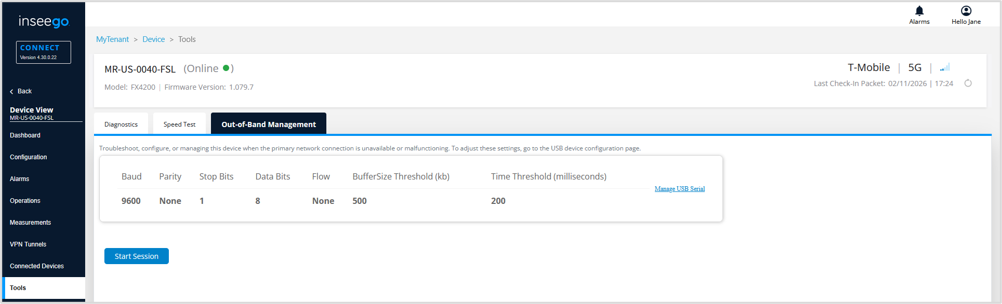
4. Ensure the serial connection configuration information matches that of the serial interface device. Click Manage USB Serial to change configuration values.
5. Click Start Session.
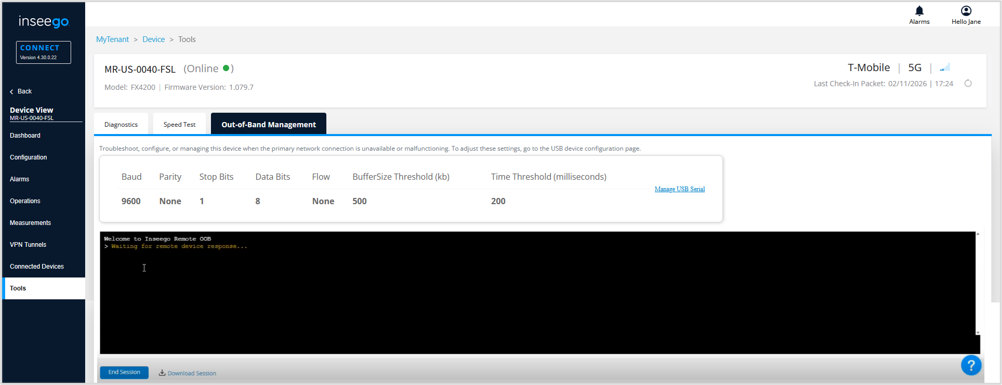
6. Once the serial interface device is detected, you are asked to authenticate it.
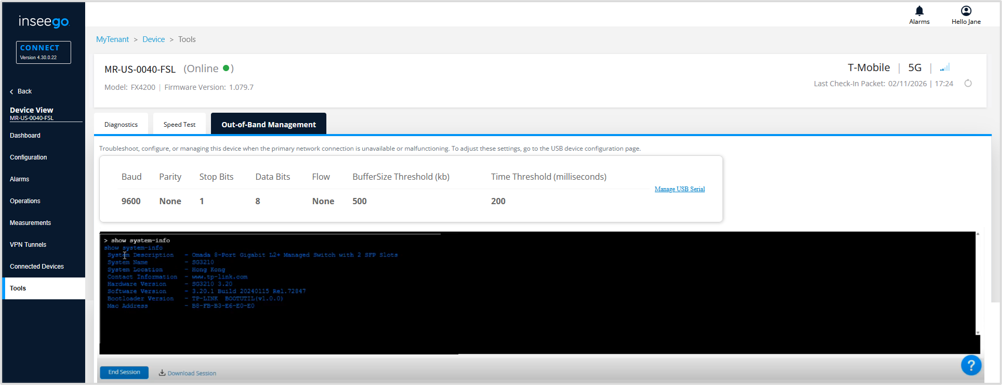
7. Utilize commands as needed to communicate with and/or configure devices connected to the serial interface device.