
User Guide
APN Connection Profiles
In most configurations, the FX4100 is used with a dynamic IP and SIM, and the Access Point Name (APN) is available from the network, for example: internet. However, if you are on a private network, you may need to configure connection profiles for your APN in this section for the network to communicate with the router.
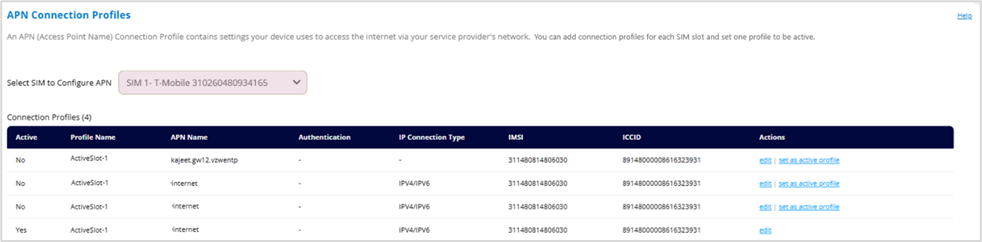
Select SIM to Configure APN: Displays your SIM information.
Connection Profiles
This table lists all the APN connection profiles that have been defined. The number of profiles appears next to the title.
NOTE: Initially, the default APN profile is displayed. You cannot delete this profile, but you can edit it and/or add additional profiles.
Priority: The order in which the profile logic checks the connection profiles.
NOTE: This column is not available when Automatically (Default) is selected in APN Settings.
Active: Indicates whether a profile is currently set as the active profile.
NOTE: Click on set as active profile on the right to select the connection profile you want to be active.
Profile Name: The name that identifies the connection profile.
APN Name: The access point name.
Authentication: The authentication method for the connection profile.
IP Connection Type: The IP connection type for the connection profile.
IMSI: The International Mobile Subscriber Identity (IMSI) for the SIM. This is a unique number, usually fifteen digits, that identifies a Global System for Mobile Communications (GSM) subscriber.
NOTE: This column is not visible if you have selected Use SIM PLMN to Match APN in APN Settings.
ICCID: The unique ID number assigned to the SIM.
NOTE: This column is not visible if you have selected Use SIM PLMN to Match APN in APN Settings.
PLMN: The Public Land Mobile Network(PLMN) for the connection profile.
NOTE: This column is only available if you have selected Use SIM PLMN to Match APN in APN Settings.
Actions:
- Click edit to edit a profile.
- Click delete to delete a profile.
- Click set as active to set a profile as the active profile.
CAUTION! Changing the APN may cause a loss of data connectivity.
Add Connection Profile: Click this button to add an additional APN connection profile.
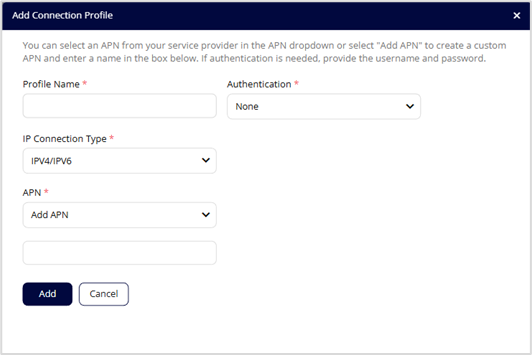
- Profile Name: Enter a name to identify this connection profile.
- IP Connection Type: Select an IP connection type from the dropdown (IPv4, IPv6, or IPv4/IPv6).
- APN: Select an APN supplied by your service provider from the dropdown or select Add APN and enter the APN for your private network in the text box that appears below.
- PLMN: The Public Land Mobile Network(PLMN) for the connection profile.
NOTE: This option is only available if you have selected Use SIM PLMN to Match APN in APN Settings.
- Authentication: Select the authentication method for your private network from the dropdown (None, PAP, CHAP, or PAP and CHAP).
- Username: Enter the username for your private network.
NOTE: This option is not visible when Authentication is set to None.
- Password: Enter the password for your private network.
NOTE: This option is not visible when Authentication is set to None.
Click Add.