
User Guide
Connecting devices with Ethernet or USB
You can connect wired devices such as laptops, printers, and gaming consoles via Ethernet or USB.
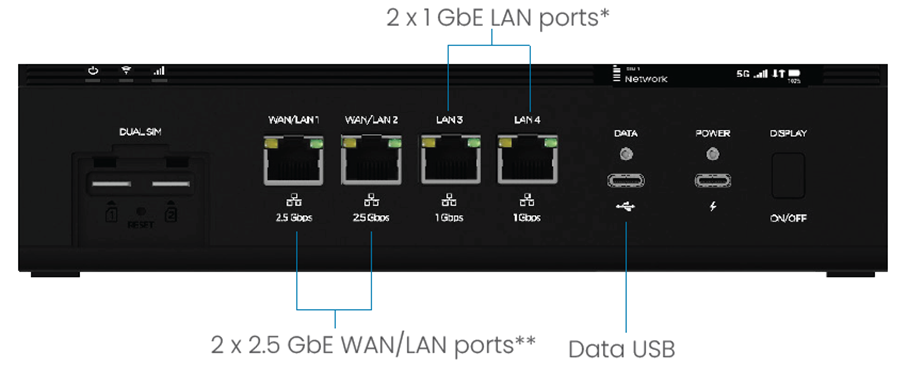
| * When running on battery, ports 3 and 4 are disabled when the battery charge level is below 40%. |
** 2.5 GbE Ethernet ports can be configured as WAN or LAN in the admin web UI or Inseego Connect with Network > Ethernet. |
To connect Ethernet devices:
1. Plug one end of an Ethernet cable into a WAN or LAN port on the router.
2. Plug the other end of the cable into the Ethernet port of the device you wish to connect.
Devices plugged into the router via Ethernet have instant access to the internet.
To connect USB devices:
To connect USB devices:
1. Plug the USB-C end of a USB cable into the Data USB port on the router.
2. Plug the other end of the cable into the USB port of the device you wish to connect.
Devices plugged into the router via USB have instant access to the internet.
NOTE: Wi-Fi devices and wired devices can connect to the mobile broadband network simultaneously.



