
User Guide
Software Versions
Software updates are delivered to your FX4200 automatically over the mobile network. This section displays current software version information, software update history, and allows you to check for new software updates for your router.
For more information on software updates, see Notes on software updates.
If your router is used on a private APN or cellular network, or if access is limited to specific sites, you must include the following URL in the access list so that automatic software updates can be delivered and you can check for updates: https://fota.production.nvtl.mifiupdates.com (TCP 443).
NOTE: Automatic firmware updates are disabled when running on battery if the battery has 40% or less charge - or when the device is on AC power but has 20% or less charge.
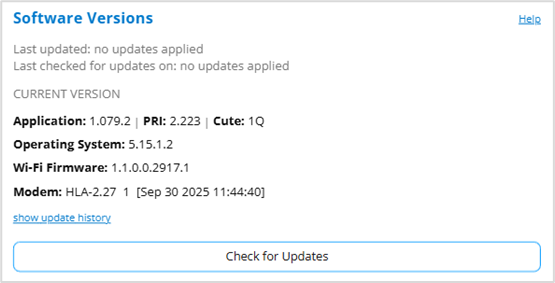
Last updated: The date and time the software was last updated.
Last checked for updates: The date and time the router last checked to see if an update was available.
Current Version
Application: The configuration version currently applied to your router.
PRI: The configuration version currently applied to your router.
Cute: The cute version of the software currently installed on your router.
Operating System: The version number for the operating system and its components.
Wi-Fi Firmware: The version of Wi-Fi firmware currently installed.
Modem: The version of modem software currently installed.
Click show update history to view the history of previous software updates.
Check for Updates: Click this button to manually check for available software updates. If a new software update is available, it is automatically downloaded. You are prompted to install with a message that your router will be unavailable for about 18 minutes during the update.



