
User Guide
SIM Settings (Inseego Connect)
The Inseego Connect SIM Settings section allows you to set conditions for automatic SIM selection or automatic SIM switching.
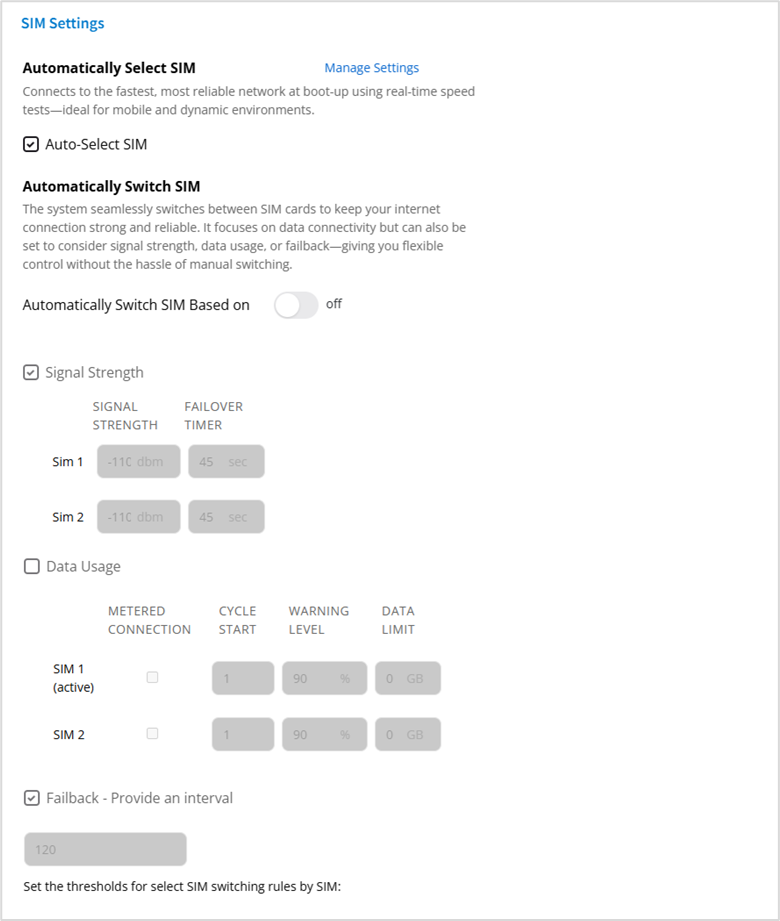
NOTE: You can enable either automatic SIM selection or automatic SIM switching. You cannot enable both at the same time.
Automatically Select SIM
Auto-Select SIM: When on, speed tests, and the criteria set with Manage Settings, determine the best SIM to use when powering on the device.
NOTE: When on, you cannot enable automatic SIM switching.
Click Manage Settings to set SIM selection criteria.
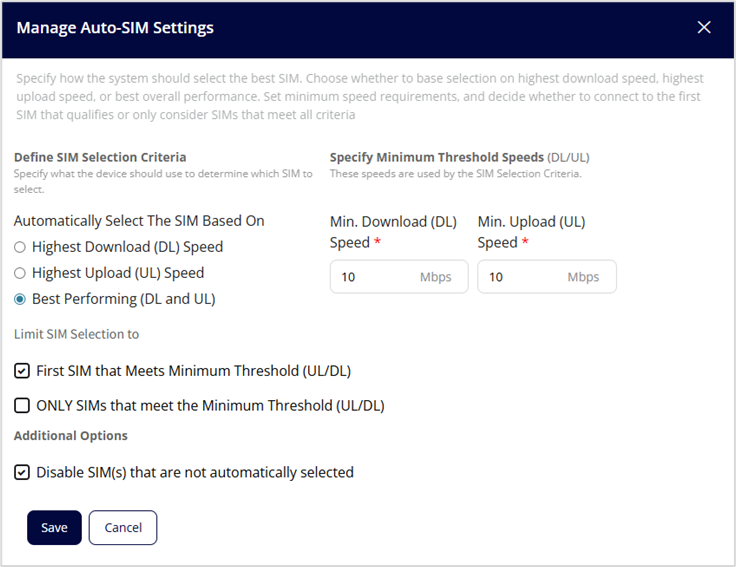
Define SIM Selection Criteria
Select the option on which to base automatic SIM selection - highest download speed, highest upload speed, or best performing (download and upload speeds).
Specify Minimum Threshold Speeds (DL/UL)
Set a minimum download speed and minimum upload speed at which a SIM can be automatically selected. Values must be between 1 and 2500 Mbps.
Limit SIM Selection to
First SIM that Meets Minimum Threshold (UL/DL): When selected, the first SIM that meets the minimum threshold speeds is selected.
ONLY SIMS that meet the Minimum Threshold (UL/DL): When selected, automatic SIM selection is limited to SIMs that meet the minimum threshold speeds.
Additional Options
Disable SIM(s) that are not automatically selected: When selected, the SIM not selected is disabled.
Click Save.
Automatically Switch SIM
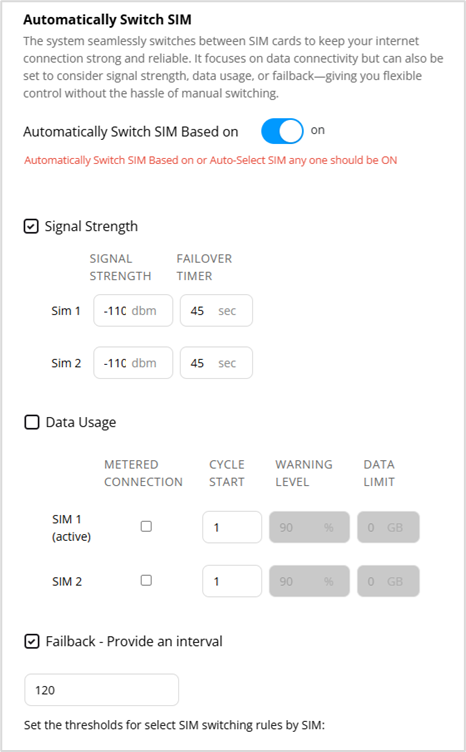
Automatically Switch SIM Based on: When on, the system automatically switches SIM cards based on connectivity and the criteria set below.
NOTE: When Automatically Select SIM is on, you cannot enable automatic SIM switching.
Signal Strength: Check this box to enable SIM switching based on signal strength. Then select a threshold for signal strength dBm and the number of seconds each SIM must fall below this threshold for the system to switch from the SIM.
Data Usage: Check this checkbox to enable SIM switching based on data usage.
- METERED CONNECTION - Check this checkbox for SIMs that have a metered connection. This box must be checked to set data usage fields for the SIM.
- CYCLE START – Set the day of the month when the data counter resets.
- WARNING LEVEL – Select the percentage of the data limit at which you want an alarm.
- DATA LIMIT – Enter the data limit for the SIM. This is the threshold at which the SIM will automatically switch.
Failback: Check this checkbox to set the failback interval for SIM switching. Enter thenumber of seconds between failback verification attempts to check signal strength and/or data usage and switch back to the primary SIM when verified.
Click Save.



