
User Guide
Status tab
The FX4200 has a rechargeable 5050 mAh LI-ion backup battery that is accessible from a compartment on the bottom of the router. Use the Status tab to view information on the status of the battery.
NOTE: Automatic firmware updates are disabled when running on battery if the battery has 40% or less charge - or when the device is on AC power but has 20% or less charge.
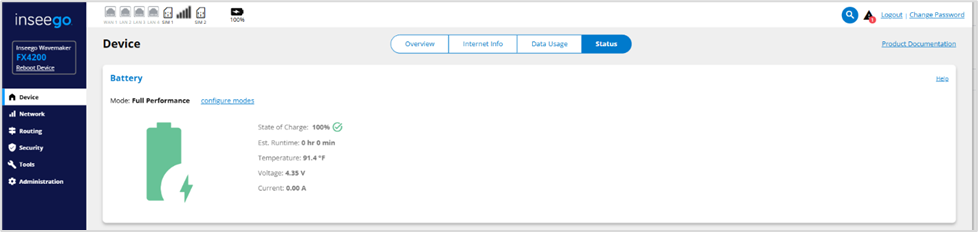
Mode: The mode the battery is currently in.
Click configure modes to configure and enable/disable battery modes to meet your needs. Refer to Battery Management*.
State of Charge: The current charge of the battery. The color is green when in Full Performance mode, yellow when in Mission Critical mode (if enabled), and red when in Low Power mode.
Est. Runtime: The approximate amount of charging time for the battery to be at full power.
Temperature: The current temperature of the battery.
Voltage: The current charging voltage of the battery.
Current: The current discharge rate of the battery.
| * This feature is not available on all devices. |



