
User Guide
Charging with a wall charger
You can charge your MiFi to a power outlet using its charging/data cable (included) and a compatible wall adapter (not included).
NOTES:
- For optimal charging, use a Qualcomm QC-compliant wall adapter with a minimum power output of 18W. You can also use a wall adapter with a minimum power output 15W, but charging time will vary.
- Use wall adapters that are compliant with applicable country regulations and safety standards. For further wall adapter guidance, see Product specifications.
To charge the battery with a charger:
1. Connect the USB cable into the USB port of the MiFi.
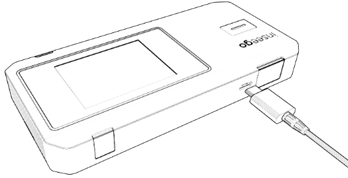
2. Connect the other end of the USB cable into a compatible wall charger and plug the charger into an appropriate electrical outlet.



