
User Guide
IP Passthrough
IP Passthrough (IPPT) enables the first device detected on the specified interface to obtain the IP address assigned by the mobile network. IPPT allows you to enable a one-to-one connection to a host routing system.
NOTE: When IP Passthrough is on, devices on other interfaces function normally. However, when IPPT is enabled, the following capabilities are set through the host routing system and web UI settings are not available:
- Port Filtering
- Port Forwarding
- DMZ (Firewall)
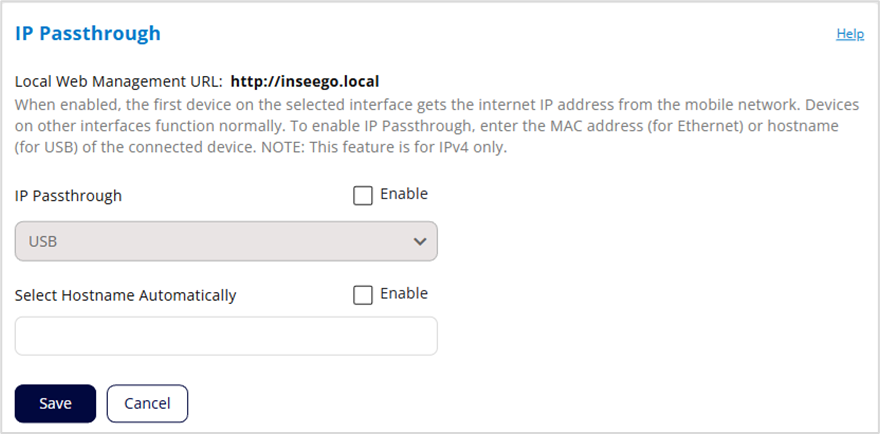
Local Web Management URL: The URL name used to access the MIFI local web UI (read-only). You can change this name with Device Name on the Administration > Preferences page.
IP Passthrough: Check the Enable box to enable IP Passthrough and select the interface you want to use for IPPT from the dropdown.
Select MAC Automatically: (visible If you select an Ethernet interface for IPPT). You can either enter the MAC address of the device connected for IPPT or check the Enable box to find the MAC address automatically. This is the MAC address of the only device connected to the selected Ethernet port that can obtain the IP address assigned to the mobile network.
NOTE: You can find the MAC address of connected devices on the Network > Devices tab.
Select Hostname Automatically: (visible If you select USB as the interface for IPPT). You can either enter the hostname of the device connected for IPPT or check the Enable box to find the hostname automatically. This is the hostname of the only USB-connected device that can obtain the IP address assigned to the mobile network.
Click Save.



